Index/search
The Index/Search tab shows the dataset's schema elements, including cubes, keys, dimensions, and measures, and lets you search for them. In addition, you can see which dashboards have associated information (descriptions and/or resources).
|
|
|
|
To open this tab, click the |
|
|
Search - To search for a schema element or dashboard that has associated information, enter some or all of the characters and click |
|
|
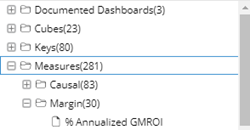
Index tree - The tree shows dashboards (only those with associated information) and schema elements, including cubes, keys, dimensions, and measures. Dimensions are located under keys in the tree. Schema elements may be limited based on your user rights. To view information for an item, double-click on it. |
|
|
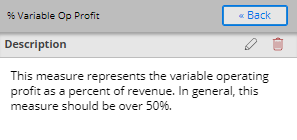
The next screen shows the associated information and may let you enter information (depending on your user rights). |
|
 button at the top of the
 .
.