Member information
Each key member or dimension member (e.g., customer, region, package, etc.) can have unique information, including links, resources, and comments. In addition, member information can include global "look-up" links (e.g., an automated Google look-up based on customer name). You can view and edit both types of member information in the Member Info tab of the Knowledge Manager panel
|
|
|
|
To access this tab, click the |
|
|
Global Info - provides dynamic links to web resources to provide additional information about members. For example, you might look up customers on Google™ search. The links can use a "global" URL and automatically insert the selected member name, code, etc., to look up specific information. Global Info links must be configured. |
|
|
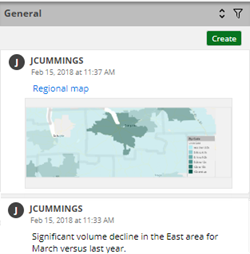
General The next section allows you to view and share unique information for each member, including resources (links, images, documents, etc.) and comments. Information is organized under topics. The first topic for any member is named "General." You can create additional topics to store information. To filter the panel to show only comments or resources of a certain type, click the filter button To create a topic, click the Create button, select Category, enter the title, and click Save. To add a link, resource, or comment, click Create underneath the category and then select the resource type. |
|
 button at the top of the

 . You can click
  to sort the items within the topics by date or user.